Automatic BOL generator that turns Shopify orders into print-ready Bills of Lading
BOLShip pulls your Shopify order and adds the freight details it needs — dimensions, freight class, and carrier — to fill your BOL and hand you a PDF ready for the driver. No retyping. No carrier portal. No blank forms.
Built for stores shipping furniture, appliances, equipment, fixtures, and other LTL freight.
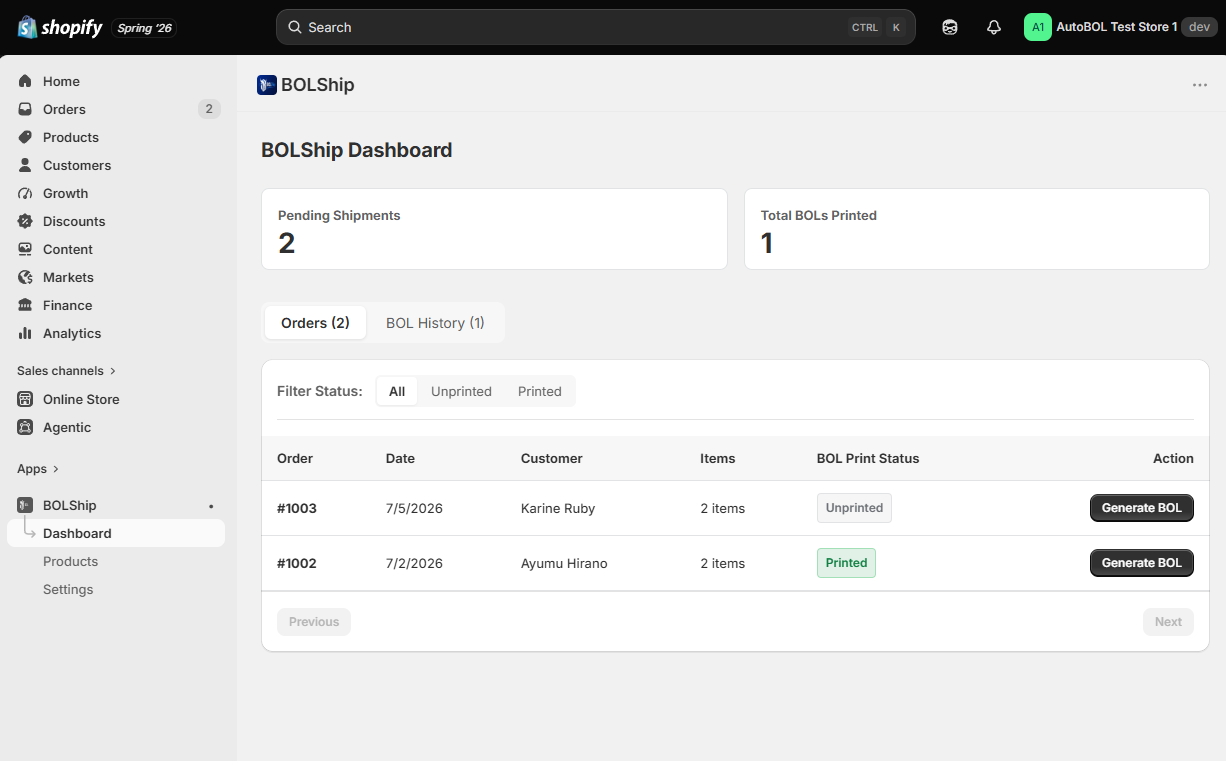
Shopify has no freight class field. No carrier SCAC. No pallet count. Every LTL shipment starts with someone retyping the same order data into a carrier website or a blank PDF form.
You don't need a freight platform to print a Bill of Lading
Most Shopify freight apps are built for one moment: checkout, where they show your customer a live shipping rate. Some go further and can generate a BOL too — but only as one feature inside a full freight-rating suite, and only when you book the shipment through their system.
That leaves a store that just needs clean paperwork with two real options today:
- Retype every order by hand into a carrier portal or a blank PDF, or
- Adopt a full freight-rating platform — often $50 to $300+ a month — and reach the BOL feature buried under the rate engine, packing rules, and carrier relationships you may not want.
BOLShip is the unbundled version. It generates the Bill of Lading on its own, straight from your Shopify order — on whatever carrier accounts you already use, at your own negotiated rates, with no broker and no booking flow to route through. Just the document, done.
From order to Bill of Lading, without the retyping
Automatic product sync with freight data
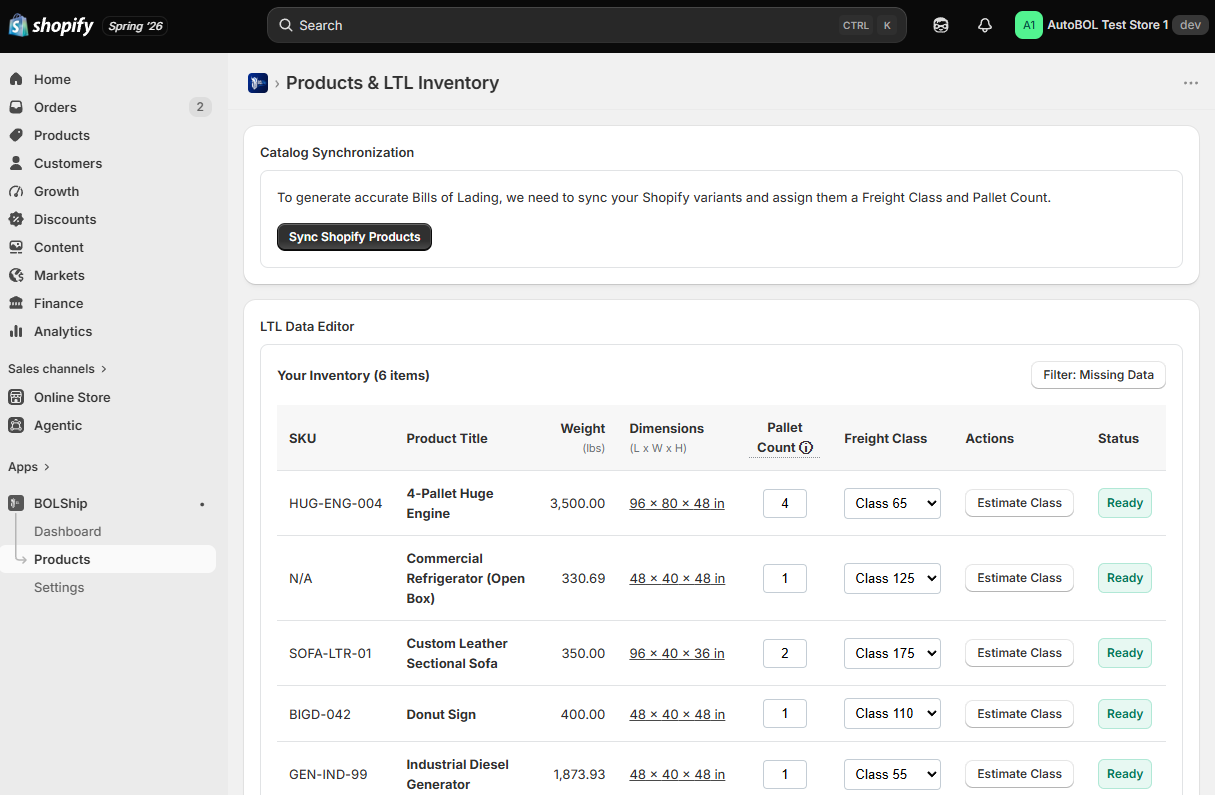
BOLShip syncs your Shopify catalog — weights included — and adds the LTL fields Shopify doesn't have: dimensions, freight class, and pallet count. Assign classes yourself, or let the built-in density calculator estimate them from each item's dimensions. Your inventory stays current with zero manual imports or spreadsheets.
Built-in freight class calculator
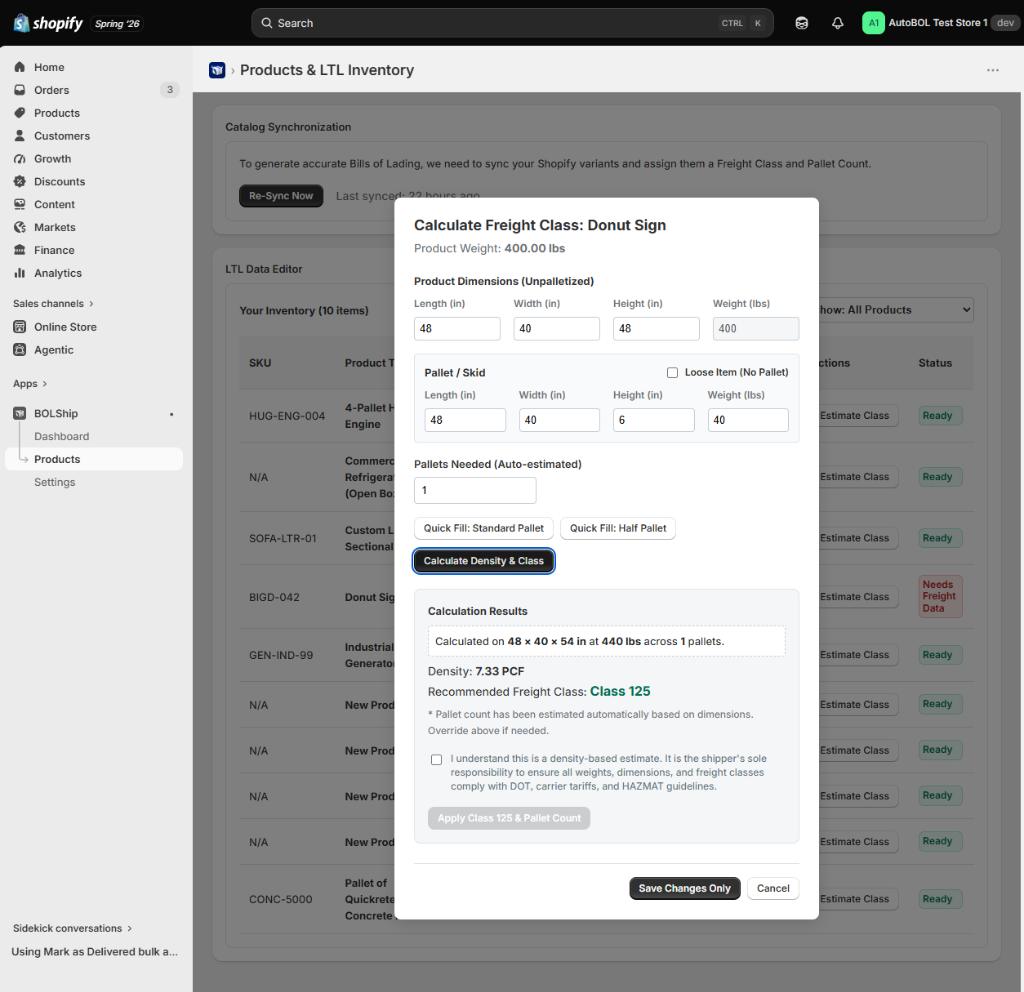
Not sure what class to use? Enter product dimensions and weight; BOLShip calculates the density (PCF) and recommends a freight class. One click applies it to the product — free on every plan.
Carrier address book
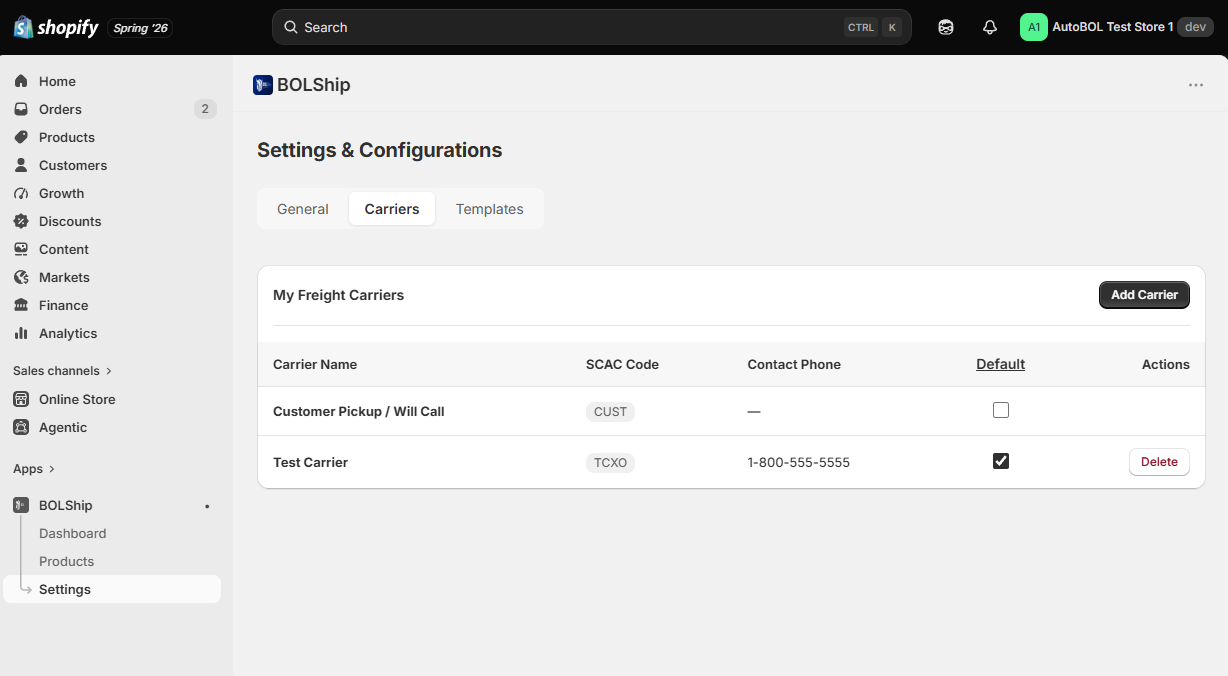
Save each freight carrier once — name, SCAC code, contact number — and reuse it on every BOL. Set a default for your most-used carrier; Customer Pickup is already there for will-call orders.
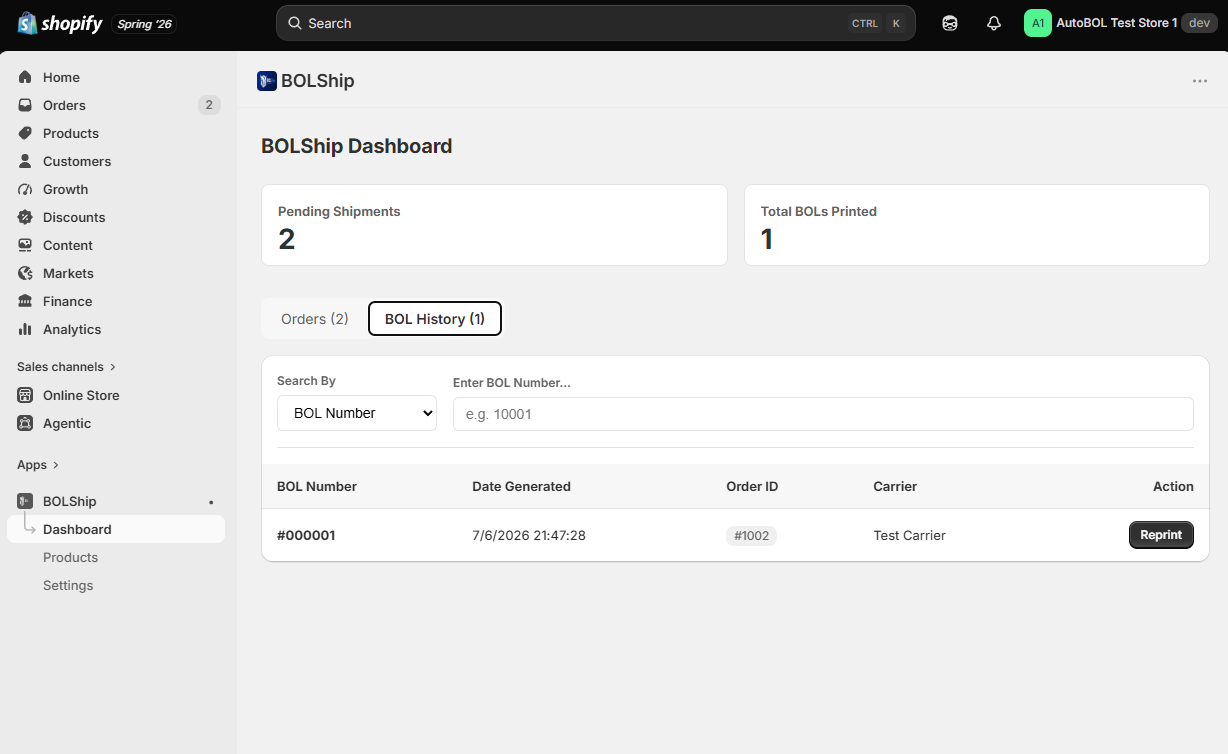
One-click BOL generation and reprint history
Select an unfulfilled order, pick a carrier, download a filled PDF. Every field comes from your Shopify order and your LTL settings. Track which orders have printed and reprint any time.
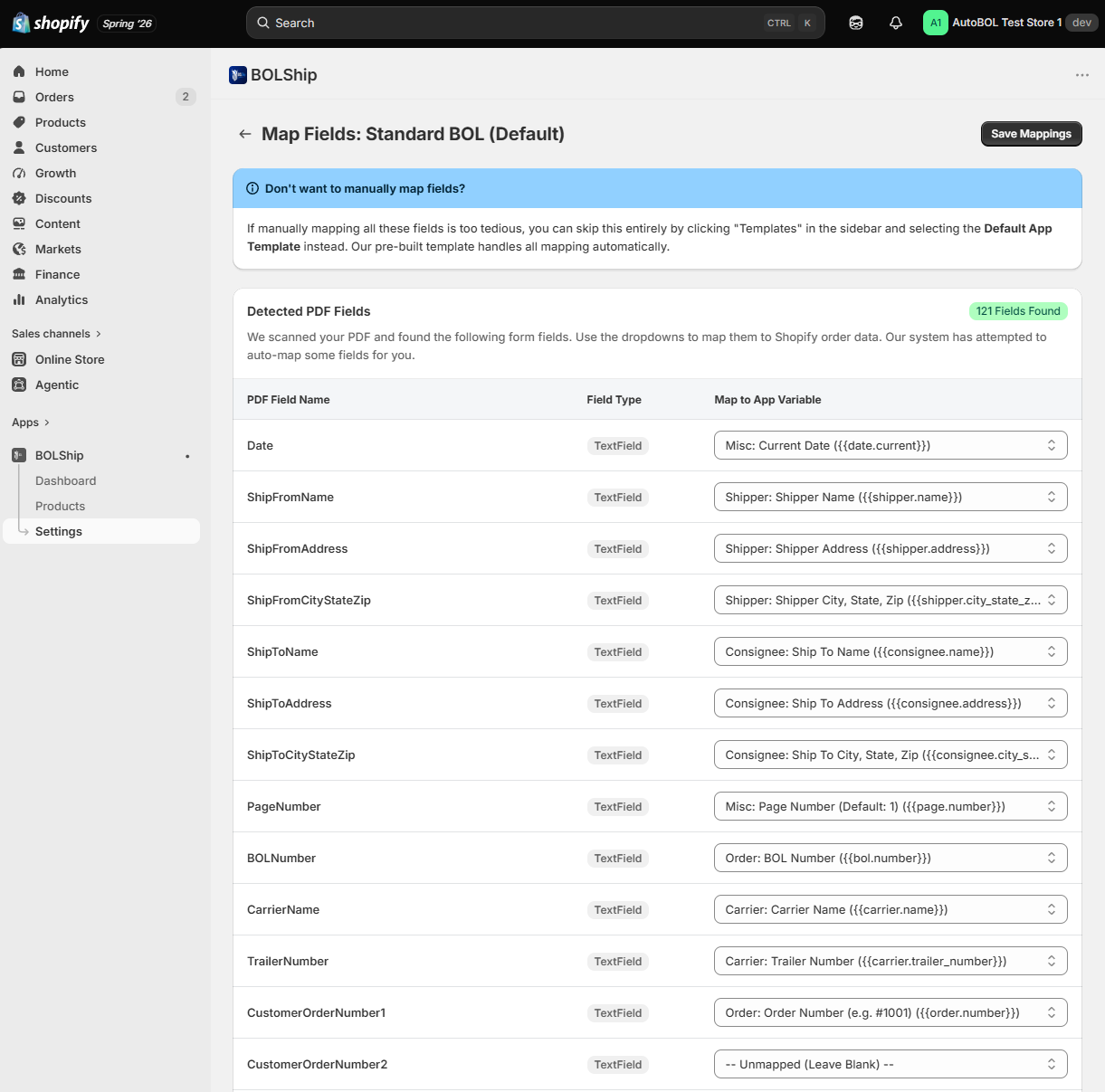
Custom PDF templates with auto field mapping
Use the included standard BOL, or upload your own — including a format a specific customer requires. BOLShip scans it for form fields and auto-maps them to your Shopify data; override any mapping with a dropdown. Switch the active template whenever you need.
How it works
Install and configure
Add BOLShip from the Shopify App Store. Enter your shipper address and add your carriers with their SCAC codes.
Sync and enrich
Sync your catalog into BOLShip. Assign freight classes, dimensions, and pallet counts to each product — by hand or with the density calculator. (You only do this once per product: the freight details are saved and reused on every future order, so you just set up new products as you add them to your shop.)
Generate
Open an unfulfilled order, choose a carrier, and download a completed Bill of Lading. Ready to print and hand to the driver.
Common questions
How is BOLShip different from freight apps that show rates at checkout?
Those apps are built around checkout — showing your customer a live LTL rate before they buy. Some can also generate a BOL, but only inside the full platform and only when you book the shipment through their system. BOLShip does the document on its own, straight from your Shopify order, on your own carrier accounts — no broker, no booking flow to route through, and a fraction of a freight-rating platform's price. The two aren't rivals — a rate app quotes the shipment at checkout, BOLShip produces the document after. You can run both.
Isn't there already a free tool to make a Bill of Lading?
There are free BOL forms — including Shopify's own — but they're manual: you type the shipper, consignee, commodity, weight, and freight class into a blank form for every shipment. BOLShip pulls that data straight from your Shopify order and your saved freight settings, so the fields are already filled. The difference is retyping every BOL by hand versus generating it in one click.
Does Shopify generate Bills of Lading?
No. Shopify has no built-in Bill of Lading generation and no fields for freight class, pallet count, or carrier SCAC code. Merchants shipping LTL freight typically retype order data into a carrier portal or a blank PDF. BOLShip adds those fields to your Shopify catalog and fills the BOL automatically.
What is a Bill of Lading?
A Bill of Lading (BOL) is the legal document that accompanies a freight shipment. It functions as a receipt for the goods, a contract between shipper and carrier, and a document of title. LTL carriers require one for every pickup, and it must list the shipper, consignee, commodity description, weight, freight class, and handling unit count.
What is freight class and how is it calculated?
Freight class is a standardized code used by LTL carriers to price shipments, ranging from Class 50 to Class 500. It is determined by four factors: density, stowability, handling, and liability. Following the NMFTA's 2025 classification changes, a wider range of commodities are now classified primarily by density, measured in pounds per cubic foot. BOLShip calculates density from your product dimensions and weight and recommends a class based on it. Density is one of the four factors, so you can always override the recommended class.
Do I still need this if my freight carrier offers free eBOL?
Carrier eBOL portals are free, but each one is separate. You log into that carrier's site and retype the consignee address, commodity description, weight, and freight class for every shipment, and the saved data only exists inside that one carrier's account. BOLShip works from your Shopify order data, so the information is already there regardless of which carrier you use, and your freight class is stored per SKU rather than per carrier account.
Can I use my own Bill of Lading template?
Yes. You can upload your own PDF Bill of Lading, including a format mandated by a specific customer. BOLShip scans it for form fields and automatically maps them to your Shopify order data, and you can override any individual mapping. Custom templates are unlimited on both the free and paid plans. Uploads must be standard unencrypted PDFs; encrypted enterprise forms are not yet supported.
What is a SCAC code?
A SCAC (Standard Carrier Alpha Code) is a two-to-four letter code that uniquely identifies a freight carrier. It appears on the Bill of Lading and is used in carrier systems and EDI transactions. BOLShip stores a SCAC alongside each carrier in your address book so it is filled automatically on every BOL.
Does BOLShip book freight or provide carrier rates?
No. BOLShip generates Bills of Lading and manages the freight data behind them. You book shipments on your own carrier accounts at your own negotiated rates. This means BOLShip works with any carrier, including regional LTL carriers, and does not require you to route freight through a broker.
Pricing
Free
Everything you need to try it on real orders.
- 10 BOL generations per month
- Unlimited custom PDF templates
- Auto field mapping
- Shopify catalog sync
- Freight class density calculator
- Carrier address book
- 90-day BOL history
Pro
For stores shipping freight every week.
- Unlimited BOL generation
- Unlimited custom PDF templates
- Auto field mapping
- Shopify catalog sync
- Freight class density calculator
- Carrier address book
- Full BOL history and reprints